
Now is the perfect time to build a Shopify app. Millions of merchants around the world build, grow, and manage their businesses on Shopify. Apps play a key role in their success by helping merchants address the unique challenges and needs of their business. In fact, apps are so important to the merchant journey that the average Shopify merchant has six apps installed on their store.
With the diversity of the merchant base growing daily and the commerce landscape changing rapidly, there are constant opportunities for developers to build ingenious solutions to a variety of merchant problems. Each stage of a merchant's entrepreneurial journey is a separate multi-billion dollar industry: product sourcing, marketing, order fulfillment, customer management, and more. The opportunity is there, but if you've never developed an app for the Shopify App Store before, where do you start?
We're here to help. In this guide, we'll take you through the six stages of app development you need to know to build and launch a successful app on Shopify, with insights and advice from Shopify developers and successful partner app developers who work with Shopify every day.
Let's get started.
table of contents
1. What you need to know about Shopify's app ecosystem
- How to integrate your app with Shopify
- App Type
- Seller and buyer data
- Shopify App Store
- Get started with the app
3. What to consider when designing a Shopify app
- Get started with Polaris
- The best app designs incorporate accessibility principles
- App designed with merchants in mind
5. App monitoring: Make performance a priority
1. What you need to know about Shopify's app ecosystem

Before you begin the process of planning and developing your app, it's important to first understand how apps work within Shopify's ecosystem.
In this section, we'll take a closer look at how apps fit into Shopify, the infrastructure and technology stack available to developers, and the different types of apps you can build.
How to integrate your app with Shopify
Shopify is designed to work for merchants right out of the box, but every merchant is unique and uses apps to solve their specific challenges.
In the context of Shopify, an app is a web application that extends the functionality of a Shopify store, allowing merchants to customize their Shopify experience to suit their needs.
The app integrates with Shopify as follows:
- Connecting to Shopify's APIs , the most commonly used being the Admin API , which allows your app to read and write data about products, customers, orders, inventory, fulfillment, etc.
- Extend new functionality to existing parts of Shopify Admin or POS
- Enhancing how stores display information to customers
App Type
The app has two different levels of accessibility.
- Public Apps: Apps available to many merchants. It can be featured in the Shopify App Store (see below) and is created in your Partner Dashboard.
- Custom Apps : Apps that are custom built for a specific merchant and cannot be listed in the Shopify App Store are created in the Partner Dashboard.
"This guide focuses on creating a public app intended for one-to-many distribution via the Shopify App Store."
In this guide, we'll focus on creating a public app intended for one-to-many distribution via the Shopify App Store. For developers new to the Shopify ecosystem, public apps are the quickest way to get up and running quickly and connect your solution to an existing merchant base.
In addition to their type, apps can take two different forms: standalone apps and embedded apps.
A standalone app exposes its own user interface on its own web domain and does not have access to app extensions (see below). An embedded app is hosted on your own infrastructure, It integrates more deeply with Shopify using the Shopify App Bridge and appears directly in your Shopify merchant admin or on your POS (point of sale) within iframe .
Embedded apps also allow you to add functionality to specific parts of your Shopify user interface (UI) and online store through app extensions. With app extensions, Shopify relays information to the app when a merchant interacts with Shopify, and then passes it back to the merchant through the extension. App extensions can be used to extend:
- Shopify Admin
- Online Store
- Shopify POS
- Shopify Flow
- Shopify Kit
We recommend building an embedded app because it's tightly integrated with Shopify and provides a much better merchant experience. This guide will walk you through the process. If you're still thinking about what use cases your app will serve, read the chapter on validating your app idea.
"We recommend building an embedded app because it integrates tightly with Shopify and can greatly improve the merchant experience."
Seller and buyer data
With millions of merchants using the Shopify platform to run their businesses, it's important that all developers take their own trust and security, and that of their customers, seriously.
The Shopify API License and Terms of Use are the final say on what is and isn't permitted on the Shopify platform. Please also see the Trust and Security page in our documentation for the following information:
- Authentication and API Keys
- API Rate Limits
- API Versioning
- Data Privacy and Sharing
- Global GDPR Compliance
- Essential Webhooks
These rules are designed to make the use of the Shopify platform fair and transparent for everyone, while at the same time protecting the data of merchants and their customers. For more information about app security best practices, see below.
Shopify App Store

The Shopify App Store is the easiest way for merchants to find apps that deliver the functionality they need to build their store. The Shopify App Store is organized by categories and has a powerful search function and recommendation algorithm to make it easy for merchants to find the apps they need.
Every published app is given a listing page in the Shopify App Store. Listed apps are publicly available to all merchants, while unlisted apps have limited visibility. Depending on your use case, both listed and unlisted apps have their own advantages.
Listed apps appear in the Shopify App Store, helping you reach more merchants and highlighting the features your app offers. Listed apps allow you to take advantage of features like app store advertising .
Benefits of the listed apps
- The only way to get found by merchants is through search
- Increased organic reach
- Brand awareness
- Reviews increase trust
- Helps sell features
- Leverage Shopify App Store Ads
A private app is a public app that doesn't appear in the Shopify App Store (but you still need to publish the app ). This lets you control who can install your app, or hide your app during off-seasons (for seasonal apps) or maintenance periods. However, to take full advantage of the opportunities and features of the Shopify App Store, we recommend that you publish your app.
Benefits of private apps
- Focus on the target shopping area
- Greater control over growth
- Useful for seasonal apps
- Ideal for maintenance periods
As you get started with Shopify, the Shopify App Store will likely be your primary source of leads and installs for your app. Optimizing your app listing page, positioning your app for success, and leveraging tools like advertising in the Shopify App Store are ways to increase installs and sales. We'll go into more detail about the Shopify App Store and how to use it in the Submit your app to the Shopify App Store section of this guide.
Get started with the app
Now that you understand the basics of the Shopify platform, you're ready to validate your app idea and understand the business opportunity you can build on Shopify.
Additional resources
- Blog Post: The Essential Resource List for Shopify App Development
- Blog Post: Online Store Go to storefront with app extensions
- Blog post: How to build a POS app with Shopify App Bridge
- Blog post: Introducing the Shopify Subscriptions API: Building apps that integrate with Shopify Checkout
- Blog Post: What app developers need to know about GDPR
- Blog Post: Web Security Fundamentals: What Every Developer Should Know
- Documentation: Shopify App Bridge
- Documentation: Authenticate your app with a session token (tutorial)
- Documentation: Embedding apps in your Shopify admin (tutorial)
2. How to validate your app idea

So you have an idea for your app. And it 's great . You understand how your app fits into the Shopify ecosystem, and you're ready to move forward with the design process. But wait... validating your idea is a step in the app-building process that you should never skip.
Validating your app idea will greatly increase your chances of success as you will know you are building something your target users need, which will result in more installs.
The key to validation is not to get too caught up in research, but to learn what you need to tweak your minimum viable product (MVP) to make it something you can build.
In this section, we'll dive into how to develop an app that solves real merchant problems, how to validate your idea through research, and what market changes and trends you need to take into account.
4 steps to validate your app idea
Validating your app idea is a process that is specific to your experience and the needs of your target market. It's an investment in your future success. Developers Preetam Nath and Sankalp Jonna spent two months researching whether their first app idea was valid before they began designing or developing it. This process was replicated by their team for their second app , DelightChat .
"We didn't want to build something and then realize that no one is using it, which has happened in the past," Nass said. "We took a longer-term approach, but we wanted to understand what was going on in the ecosystem and what the various issues were."
There are lots of ways to prove that your app idea is a good one, but here are four key questions to help you get started:
- Does this idea solve a real merchant problem?
- How is my target market currently trying to solve this problem?
- Are merchants willing to pay for a solution to this problem?
- Can you actually build an app?
Let's look at each of these questions in more detail.
1. Does your app idea solve a real merchant problem?
First, you need to clearly define what you mean by a "real problem." Since problem solving is a full-time job for a merchant, it can be difficult to know where to start.
The real problem is the one that the store owner is actively spending a lot of time, money, stress and effort trying to solve. So how do you find out what the store owner's problem is? Go straight to the source.
Nath and Jonna posted questions on forums like the Shopify subreddit and the Shopify Community forum , and spoke with merchants via direct messages to get clear answers to their questions. They also joined various Facebook groups to listen and learn more about merchants' frustrations.
If you're already working with a merchant, consider sending them a feedback form or survey to learn more about the issues they're facing. If you don't already work with a merchant or would like to learn more, skip to question 2.
Once you know your app can solve a real merchant problem, the next step is to learn more about whether and how merchants are already trying to solve that problem themselves, and to anticipate new challenges they may face within their industry.
What’s happening in the industry and what are the trends?
Every industry, and every stage of the merchant journey, has its own unique challenges, and each stage is a potential multi-billion-dollar industry you can enter. Stay on top of trends and disruptions in your specific industry, whether it's marketing, shipping, finances, customer support, product sourcing, or whatever, to understand that industry's past, present, and future concerns and ambitions.
"Every industry and every stage of commerce has its own challenges, and each stage is a potential multi-billion-dollar industry to enter."
Taking the time to understand your target market, potential users, and industry trends can save you time and effort while refining your MVP. This all comes down to the research you do before you start building. Learning about app development business trends that apply to your app idea is an ongoing process, so leveraging your existing expertise and knowledge can make it easier for you to get started.
In just three months at the start of 2020, COVID-19 changed the way many merchants do business and accelerated e-commerce growth beyond what is expected to happen in the next decade .
Check out how Shopify App Challenge winner Tilo Mitra built his first app in response to these new challenges.
Leveraging your past experience with current clients or in the industry or adjacent market you’re developing your app for will give you a competitive advantage because you already understand user pain points and industry trends.
Read our case study to learn how co-founders Aneto Okonkwo and Andrew Olaleye built customer support app Chatdesk based on their experiences, goals, and lessons learned throughout their careers .
Conducting market research
Even if you don't have experience in the industry you're developing for, you can do market research for your app . Understanding what excites and frustrates your customers will help shape your product.
At this point, you've already spoken to retailers and figured out where and how your app can add value. Get more information about how your app fits into the "big picture" by:
- Read industry publications and white papers, such as Shopify's annual Future of Commerce report and McKinsey's quarterly Five Fifty report
- Follow social media industry leaders and experts, including the Shopify leadership team, Director of Partnerships Fatima Yusuf , President Harley Finklestein , CTO Jean-Michel Lemieux , and CEO Tobi Lutke
- Monitoring commercial and business news reports
- Talk to an industry expert
- Creating a focus group
- Analyze seller feedback and concerns on social media and community forums
- Analyzing app reviews on Shopify App Store
- Subscribe to our newsletter for new features and more for Shopify developers
- Attend events like Shopify Partner Town Halls
- Subscribe to related blogs, such as the Shopify Partner Blog , the Shopify Engineering Blog , and the Shopify Merchant Blog.
- others

Some of the most successful apps in the Shopify App Store started out by proactively solving a problem for merchants. Look back at past successes with specific clients, platforms, or markets to see if there are any trends or patterns you can build on.
Does this app solve a niche need or a functionality gap?
While there are multiple apps in each category in the Shopify App Store, remember that with millions of diverse merchants and more coming every day, each merchant may need something a little different depending on their size, industry, goals, and where they are in the world. This means that every category has a niche need that you can discover and create a solution for. An app that works for one segment won't necessarily work for another.
"Adding significant value to niche merchants' agendas is one of the keys to standing out."
There are lots of opportunities to solve merchant pain points that haven't been addressed before. Adding significant value to a niche merchant problem is one of the keys to standing out. For example, if you want to build an SMS app but feel there's too much competition, you can further research the needs of key geographies or specific merchant segments and target a solution that makes sense for them.
Learn how Heyday addressed a functionality gap, established a differentiated value proposition, and successfully launched their self-service app on the Shopify App Store in 2020.
There's no one right way to differentiate your app's value proposition, and Nath says analyzing reviews of other apps to understand what problems they weren't solving helped him understand where the gaps were in his chosen field. This helped Nath understand the underserved areas his app could address and what his users' expectations were.
"It took a whole day but it was worth it as we now know exactly what shopkeepers gave five-star reviews for and what they didn't like," he said.
It is important to remember that simply creating a copycat app does not bring any value to the seller. Without adding significant, original or new improvements, your app will not stand out. This is also an ethical issue and may result in copyright infringement.
"It's important to remember that simply creating a copycat app doesn't add any value to a merchant. Without significant, unique or new improvements, your app will not stand out. This is also an ethical issue and a potential copyright infringement."
2. How is your target market currently trying to solve this problem?
The quickest and best way to understand how your target market is going to solve this problem is to talk to actual merchants. The good news is, it's easier than you think.
After Nath and Jonna identified the right communities to join to learn from and connect with merchants, they connected with merchants directly to learn how they were already trying to solve the problem.
"Reach out to five people you see in Shopify Facebook groups, subreddits, or forums and ask them, 'Do you need this app? If not, why not? If you do, what do you need it for?' This will open up a Pandora's box of qualitative information," Nath says.
When you take the time to speak to your target users, you’ll not only find out what their problems are, but also what they perceive as the solution.
For example, a retailer may already be paying someone to solve a problem, which may be expensive or may not meet their needs. The retailer may not necessarily see the outsourced work as a pain point , since it's a task that's already been handled. This is important to consider, because you may need to dig deeper and ask specific, nuanced questions to truly understand both the problem and how your app meets your user needs.
Additionally, if you're considering building a custom app to solve one merchant's unique needs, research whether it's applicable to other merchants in the same industry or with similar characteristics. By publishing a public app in the Shopify app store , you'll likely be able to better serve a broader market with similar challenges.
3. Are retailers willing to pay for a solution to this problem?
Figuring out whether your app idea can be monetized is the next piece of the puzzle.
"If you want to build a free app just to get a feel for the ecosystem, that's fine," Nass says, "but if you want to grow your app into a product or business that replaces your salary, you need to know whether people are willing to pay for it."
If you want to grow your app into a product or business that can replace your salary, you need to know if people are willing to pay for it.
The best way to find out is to find out if people are already using existing solutions and, if so, how much they are paying for them.
"That price point is a game changer for business," Nath says. "When we were developing DelightChat, we were very conscious that we wanted to serve merchants who were doing a certain level of business in the $100-200 price range."
Many apps offer free versions or free trials so merchants can try out different features to see if they fit their needs.
As we discussed above, if your target users aren't already using an app or software to solve the problem you're considering, they might be hiring a freelancer, paying someone part-time to work on the problem manually, or even hiring a full-time employee. How much are they paying for that solution? Would they be willing to pay for an app instead? This is where you should ask merchants on forums and in direct conversations to learn more about their stopgap solutions.
4. Do you have the expertise and time to build this app?
Once you've taken all of your merchant insights, industry trends, and current opportunities into consideration and researched your target market, you need to decide if what you want to build is feasible and by when. There are different levels of complexity behind apps, so you need to make sure your build timeline is realistic.
"It might take a team of one person to develop an app, but there are some apps that you can develop alone in two weeks," says Nath. "You have to pick a problem that you can solve, otherwise you're just going to fail."
It may take a team of one person a year to build an app, but there are also apps that one person can build in two weeks. You need to pick a problem that you can solve, or you will just fail.
The Tools and Resources section of this guide provides more in-depth information on how to build a Shopify app.
If you're building a Shopify app at a higher price point, merchants will expect a higher quality app with more features. That said, remember that your app doesn't have to have every feature to be valuable: your users can give you feedback on your MVP, which you can use to improve your app over time and build the features your users really want.
Summary: 4 questions to answer when validating your app idea
- Does your app idea solve a real problem?
- How is your target market currently trying to solve this problem?
- Is this a problem people are willing to pay to solve?
- Do you have the expertise and time required to build an app?
Building for the Right Reasons
Now that you know how to validate your app idea driven by the business opportunity you want to build on Shopify, you're ready to dig deeper into app design principles and key resources you can use to design your Shopify app.
Additional resources
- Blog Post: Why you should build an app that solves merchant pain points
- Blog Post: How to Conduct Competitive Analysis that Gets Results for Your Clients
- Blog Post: Introducing the Shopify App Challenge: Commerce and COVID-19
- Blog Post: Research 101: How to Conduct Market Research for Your App
- Guide: How to increase app downloads with the Shopify App Store
3. What to consider when designing a Shopify app

Designing an app that seamlessly integrates with a merchant's online store results in a more familiar and engaging user experience (UX) and a more intuitive user interface (UI). The design principles you incorporate into your app represent not only your brand but also your values. The more user-friendly, accessible, and beautiful your app is, the more satisfied your customers will be and the more likely you are to increase customer retention.
In this section, we'll take a closer look at the factors you need to consider while designing a Shopify app, as well as the tools that can make app designing easier and faster.
Get started with Polaris

Polaris is Shopify's open-source design system that in-house and third-party developers use to design and build apps that seamlessly integrate into merchants' stores. Polaris speeds up the design process and delivers a familiar app experience for users while complying with web accessibility standards.
Although we recommend building your app within the Shopify Admin, you can use Polaris whether your app is embedded within Shopify Admin or running outside of it.
"From a front-end developer perspective, one of the things I always look at is how useful Polaris is," says Jennifer Gray, a front-end developer at Shopify. "If you want to deploy embedded apps, which is what we recommend, Polaris provides a seamless user experience."
Using Polaris components speeds up your development process by eliminating the need to build custom UI elements. Polaris components are pre-built, flexible, and easy to implement, so you can create a positive UX even if you're not a design expert.
The Polaris components are a collection of interface elements that can be used throughout your app. They include:
- color
- typography
- Illustration
- icon
- Interaction Status
- interval

Leveraging common conventions makes your app look like it "belongs" in the Shopify Admin. Users can use conventions they're already familiar with, without having to learn how to navigate a new UI. Polaris conventions also take accessibility into consideration.
When building a Shopify app, keep the value of the Shopify experience in mind.
Consideration: Think about how users will access your app, including their device, language, location, and accessibility needs.
Empowerment: Shopify merchants have a wide range of skill levels, needs, goals, and experience. Optimize your app for the tasks that matter most by removing unnecessary complexity, and give users access to additional functionality when they need it.
Well-crafted: A beautiful app is made by helping users solve a problem, and attention to detail and thoughtful design make or break the user experience.
Efficient: Keep designs and tasks simple and clear. Users should be able to complete actions quickly, accurately, and easily.
Trustworthy: Be transparent about what your app can and can't do. A trustworthy app demonstrates to users that you are acting in their best interests, and this is reflected throughout the app's UX and UI.
Familiar: When users become accustomed to using a digital product, they can focus on the task at hand instead of trying to navigate a complex UI. Use familiar patterns to make the UX clear and intuitive.
Polaris gives both designers and developers the tools they need to design beautiful and functional Shopify apps, but that doesn't mean you can't apply your own creativity to the design process.
When designing a Shopify app, you should always keep your users' unique needs top of mind. Feel free to add custom components that will work seamlessly with your Shopify admin.
Shopify Partner Pledgeling won the 2017 Shopify Commerce Award for Best App Design using Polaris . The judges praised the Polaris design and how they kept the UX and UI aligned with the Polaris principles while adding custom components that their users needed.

Polaris ensures your app fits seamlessly into your merchant operations. Read the Polaris documentation for everything from design guidelines, accessibility considerations, internationalization, information architecture, and more.
If app developers don't have a designer on their team, Polaris is exactly the tool they should be using.
"If an app developer doesn't have a designer on their team, Polaris is exactly the tool they should be using," Gray says.
Polaris is an evolving design framework, and the recent release of Polaris v6.0.0 brings many feature updates, including updated visual style with a new color system, rebuilt high-quality components, reduced bundle sizes, and additional accessibility features.
Check out some examples of standalone apps that use Polaris as a UI component library on GitHub .
The best app designs incorporate accessibility principles
Inclusive, accessible, and easy-to-use design are three principles that intersect when creating digital products that are easy for everyone to use. While "everyone" can be many people with different experiences and abilities, it's possible to build a Shopify app that's inclusive, accessible, and easy to use for all.
The best UX and UI apps are designed to be inclusive and accessible - inclusive design takes into account the needs of all users and benefits all users, regardless of their abilities.
Three key elements that contribute to a high-quality, accessible UX are:
- Functional and beautiful UX/UI design
- Consistent, helpful copy that is carefully written in clear, plain language
- We actively embrace the principles of universal design and inclusion
We've already talked about how to follow Polaris design principles to ensure your app functions and fits the look and feel of your business. Let's dive deeper into two topics:
App copy: Write for everyone
Designing a beautiful, functional app is a great start. It's equally important that any language you use to explain how to use your app is easy to understand. That means using easy-to-understand language, without jargon or phrases that might confuse people unfamiliar with the topic or the language itself.
As of January 2020, English is the most popular language online, accounting for approximately 26% of all internet users worldwide , followed by Chinese at 19%.
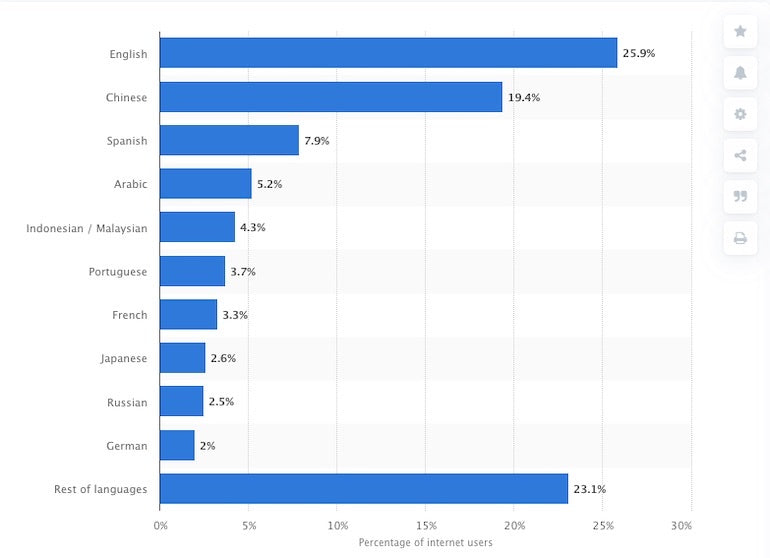
We recommend prioritizing language in your app design, considering both your target users and potential future growth users. Learning how to build a multilingual Shopify app will give you a competitive advantage.
The Polaris Content Guidelines consider plain language to be a 7th grade reading level in the United States. There are many tools you can use to check if your content is grammatically correct and easy to understand. Many of these tools also tell you the readability level.
Here are three content tools you can use to get started.
- Hemingway App (free)
- Grammarly (free and paid subscriptions)
- Readable (Paid, tiered, annual subscription)
The Internationalization section below goes into more detail about the nuances of writing for a global audience.
Helpful tips from the Polaris Content Guidelines :
- Write short pieces (ideally less than 15-20 words).
- Use headings and bullet points to make your content easy to read.
- Always choose short, simple words over long, complex words.
- Think about translation: avoid idioms and phrases that have indirect or sarcastic meanings.
- Avoid jargon. Use industry-standard terminology only if you are sure it will help improve understanding. Spend time researching the words people actually use, rather than relying on the words companies call out.
- Edit out unnecessary or duplicated words.
- First, write for small screens. These constraints help you focus on your most important message.
- Try reading your content out loud - if you stumble or it sounds like something a human would say, you need to revise your content.
Now that you have a solid understanding of how to create content within your app, let's take a closer look at what it means to design an app that is inclusive and accessible.
Designing for accessibility, usability, and inclusion
As your app expands and grows, it's important that it remains inclusive, accessible, and easy to use for Shopify's millions of merchants. Each user has unique needs, so learning how to support those needs now will make it easier to scale your app in the future. To do so, keep these three design considerations in mind:
1. Accessibility
Polaris components are It's designed to meet accessibility standards and maintain a consistent experience while using your app. If you haven't already, consider how you define an "average" user and whether you've designed your app with users with disabilities in mind. There are lots of things to consider, from keyboard accessibility to visual design elements.
The World Health Organization reports that as of December 2020, more than one billion people worldwide, or about 15% of the world's population, are living with some form of disability, and that number is growing Familiarizing yourself with the Web Content Accessibility Guidelines is a great starting point for learning more about accessibility standards and techniques so you can apply these principles when building your apps.
"Don't ignore accessibility when designing and developing your app, " says Scott Vinkle, Platform Accessibility Specialist at Shopify.
"Accessibility helps ensure an assistive technology -friendly environment for people with disabilities," adds Vinkle. "It also helps seniors use your site or app, improves SEO , reduces accessibility-related lawsuits , and gives people with disabilities an equal opportunity to unlock the power of commerce."
Give people with disabilities an equal opportunity to unlock the power of commerce.
When building your app, keep these basic principles of accessibility in mind:
- Can the user perceive the content ? The user must be able to observe and identify the content using one of their available senses.
- Can users interact with the user interface ? They should be able to complete tasks using the input device that works best for them: a mouse or touchpad, keyboard, touchscreen, screen reader, or voice dictation software.
- Will users understand the content? Create content and user interfaces that people can understand. Use simple language delivered in the correct language for a consistent user experience.
- Is your content robust ? Supports a wide range of devices and assistive technologies. Use standards-based semantic HTML and ARIA where appropriate .
Vinkle says it's important to apply these principles and test them with assistive technology.
Expand your app's usability to reach more people, which can lead to more positive reviews and revenue from your app.
"Broaden the usability of your app so more people can use it," he says. "This will likely lead to more positive reviews and more revenue from your app."
Here are five assistive technology testing tools and useful resources to help you improve the overall accessibility and quality of your app.
- Color Contrast Analyzer : Check the readability and contrast of your app's design elements with this app for Mac and Windows
- Color Oracle : Simulate color blindness with this app available for Mac, Windows, and Linux
- Sketch Color Contrast Analyzer : Check that your designs meet color contrast recommendations right within Sketch.
- Inclusive Design at Microsoft : Learn and implement accessibility best practices by following Microsoft's inclusive design principles
- Accessibility Insights : Resolve accessibility issues before they reach merchants with this automated accessibility testing tool.
2. Internationalization
Building an interface that works no matter where your users are in the world not only increases your reach to a global market, but it also improves your overall UX.
Be sure to plan for the following:
- Cultural differences: From icons to images to content, localizing your app doesn't just mean translating it into the local language, it also means adapting to regional differences and being mindful of content that may be confusing or offensive.
- Text expansion: When your app's text is translated, it may expand and take up more space, so your interface needs to have built-in flexibility to accommodate language-specific formatting that can vary significantly from language to language.
- Word order changes: It's safe to assume that the word order of all sentences in your UI will change during translation, so it's best to avoid using UI components to build sentences and use concatenated strings sparingly or not at all.
Understand the fundamentals of Polaris internationalization so you can create a great UX for your users wherever they are.
For more information about principles that can help you build a truly internationalized app, check out our detailed blog post Internationalization: Practical tips for building for a global audience .
3. Information Architecture (IA)
Information architecture (IA) is the way all content is organized, structured, and labeled with the goal of helping users find the information they need and complete their tasks efficiently. Effective IA:
- Simplify the complexity
- Supports scalability
- Create familiarity
Familiarizing yourself with the Polaris IA principles will help you in the process of making good IA decisions no matter what project you're working on. Keeping your app organized and clear will help prevent users from becoming confused, especially if your app is complex.
To learn more about IA and how to get started, check out our recent blog post, " An Introduction to Information Architecture."
App designed with merchants in mind
A clean app design with easy-to-understand UX and clear language is essential to building an app that merchants love. Users interact with the web, apps, and dashboards on a daily basis, so they have high expectations about how your app will integrate with and interact with your online store.
Now that you have an understanding of how app design principles affect user experience, you're ready to start building an app.
Additional resources:
- Blog post: Building apps: 3 things we learned about achieving consistent, scalable design
- Blog Post: 10 prototyping myths debunked
- Blog Post: Improve your design process with four deliverables
- Blog Post: Everything you need to know about rapid prototyping
- Blog Post: Announcing the Winners of the 2017 Shopify Commerce Awards (Polaris)
- Blog post: 5 steps to designing your app with keyboard accessibility in mind
- Blog Post: Introduction to Information Architecture
- Digital Properties: Polaris
- Documentation: Designing Apps for Shopify
- Documentation: Component Library Documentation
- Documentation: Polaris Resources
- Documentation: Polaris Accessibility Documentation
- Polaris GitHub: License
To learn how to use our developer tools to build Shopify apps, see the developer documentation at shopify.dev .
4. Submit to the Shopify App Store

The next step in getting your app live and in the hands of the merchants who will benefit most from it is to submit your app to the Shopify App Store .
Before your app can be published, it must be reviewed by the Shopify App Review team. The app submission and review process typically takes Partners several weeks to complete and includes the following steps: 1
Meet Shopify's technical, security and UX requirements
2. Create an Effective App List
3. Test your app for performance and bugs
4. Apply any fixes requested by the review team
Preparing your app for submission
The Shopify App Review team's goal is to get you through the review process as quickly as possible. Knowing what to expect up front and what information you need to have ready can help you move through the review stage more quickly.
Before you submit your app for review, follow these three steps:
1. Meet Shopify's app requirements
All published apps must meet technical, security, and UX requirements to be accepted by the app stores. Follow these requirements as you build your app and prepare it for submission to ensure a successful publishing experience.
Please note that private apps are a type of public app and therefore must meet the same requirements as public apps - this is important to maintain quality standards for merchants, but also because the visibility of these public apps may change at any time.
Additionally, certain app configurations have additional requirements, including but not limited to:
- Online store app
- Embedded apps
- Product Sourcing App
- Sales Channels
- Purchase Option App
- Checkout UI extension app
2. Write a list of apps
[September 2022] New App Listing Guidelines
As of September 2022, the Shopify App Store app listing requirements have been updated. Some of the information in this section may be out of date. To ensure that your app listing is optimized for merchant installs, please review our documentation for the latest guidelines.
View documentationAll public apps (listed or unlisted) require a complete app listing in order to be submitted. Your app listing page serves as your app's home in the Shopify App Store. This information is your most powerful tool to convince users that your app is the best solution for them. Because this is such an important surface, you should spend time understanding your app listing requirements and how to optimize it .
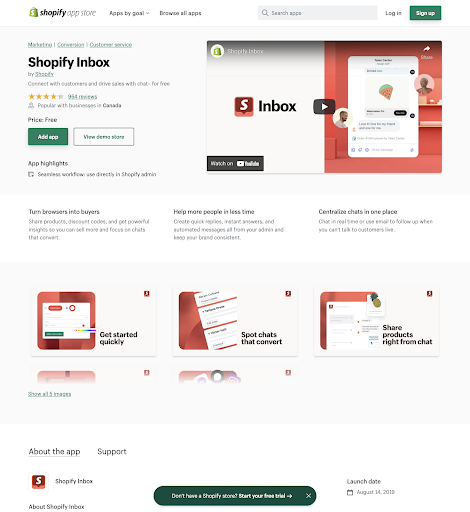
Some of these elements are optional, but the more information you provide to potential users, the better.
Your app listing is a key factor in acquiring new installs and users. For detailed guidance on creating the best listing page, check out our guide on How to get more app downloads on the Shopify App Store .
3. Test your app
Once you are sure that your app meets the app and listing requirements above, we recommend that you ensure that your app is thoroughly tested. Shopify is a complex platform, and no two merchants have the same needs or goals. Thorough testing helps to catch as many errors and bugs as possible so that your app won't break when installed by a wide variety of merchants.
When testing your app, you need to ensure that it functions properly for users, especially non-technical merchants.
To learn more about testing your app, check out our documentation, or you can read our blog for a detailed guide to user testing your app .
4. Submit your app
Once your app and listing are ready, thoroughly tested and prepared, follow the instructions in our documentation to submit your app through your Partner Dashboard. The Shopify App Review team will ensure that your app is a finished product and merchant-ready from the moment it's approved in the Shopify App Store.
Review Process
On average, apps are reviewed within 7 business days of submission. We'll keep you updated on the review progress and provide feedback.
You can learn more about what to expect during the approval process in our developer documentation .
Revisions and Changes
Approval times can vary from a few days to a few weeks or even months, depending on how quickly you can resolve any issues found. It's common for us to ask you to make changes or fixes to your app after the review. We'll notify you of any updates you need to make via email.
If the changes required are substantial, your app will be rejected and you'll be able to resubmit it once you've fixed any outstanding issues. However, if the changes are relatively minor, you'll be in touch with the review team via Zendesk to discuss your app and make any necessary updates.
Once you've fixed everything that needed fixing, and the review team is satisfied that your app meets their standards, it will be approved and published on the Shopify App Store. Celebrate! You've made an achievement!
Additional resources:
- Documentation: Shopify public app requirements
- Documentation: Test your app before submission
- Documentation: Submitting your app
- Documentation: Review Process
- Documentation: Authentication with OAuth
- Documentation: Use the GraphQL Admin API to charge for your app
- Blog Post: 7 Insights from the Shopify App Review Team to Help Your App Succeed
- Blog Post: User Testing Shopify Apps: Public App Use Cases to Test
5. App monitoring: Make performance a priority

Before you release your app, there are a few things you should know about how to maintain the health, security, and performance of your app after release.
In this section, we'll discuss what it means to have a "healthy" Shopify app and what it takes to keep it successful so that it remains useful to merchants in both the short and long term.
App Health in the Shopify Ecosystem
A sound Shopify app fulfills the specific use case for which it was installed, while also allowing the developer to continually grow and scale their own business.
Maintaining the health of your app means staying on top of any changes, addressing potential security issues, and monitoring business analytics that help you understand how your app is performing within the Shopify ecosystem.
Breaking Changes and API Versioning
Shopify is constantly building, changing, and growing, and as a developer, it's important to stay on top of all these changes to keep your app secure and up to date.
We always aim to announce changes in advance and notify developers about versioning and deprecations as the release approaches. The Partner Dashboard, developer changelog , and developer documentation make it easy for developers to stay up to date on upcoming changes. We also announce updates in advance on the Partner Blog .
In addition to the resources above, the Partner Dashboard also provides an API Health report that shows you any deprecated calls being made in your public or custom apps, and the deadlines for updating those calls in your apps.
Additionally, we communicate regularly via email about any important updates or breaking changes in advance, so you should make sure your developer contact information is always up to date.

In 2019, Shopify introduced API versioning, which gives both Shopify and third-party developers a clear view of when certain changes are made to the API. Shopify releases new API versions quarterly. These releases typically occur on January 1, April 1, July 2, and October 1 (or thereabouts). Once a version is released, it lasts for approximately one year and is named in the format year-month , such as 2020-10 . Each stable version is locked for one year, after which support is not guaranteed. Your app should always stay on a stable version to avoid breaking changes.
In addition to the many ways that Shopify offers to help you stay up to date on app performance and ecosystem updates, there are also a number of performance management and analytics tools you can use to maintain the health of your app after release.
App performance management and monitoring
There are a variety of monitoring tools you can use to ensure your app remains healthy and stable as you build new features, enhance performance, and grow your user base. Ensuring that all the software in your technology stack is running smoothly helps you maintain a consistent, high-quality user experience and minimizes downtime.
App performance monitoring tools like Bugsnag , Datadog , and Sentry monitor the stability of your apps and make it easy to identify and resolve errors across applications in your tech stack. Each of these tools comes with different costs.
Services like AWS Lambda allow you to run code without provisioning or managing servers, and automatically scale based on the number of event requests you receive without having to upgrade your servers, preventing situations like slow app loading and poor user experience.
Depending on where most of your users are located, your app might experience spikes in usage at certain times, and you need to set up your infrastructure so that spikes don't result in downtime.
Using app performance monitoring or management tools helps you understand the stability and security of the underlying system. It helps you predict or forecast how your app will perform if there is a sudden surge in the number of installs for example. It helps you predict the performance of your app based on different user loads.
However, not all app performance monitoring tools are created equal in terms of features, and pricing varies between vendors, so we recommend doing your own research to find the tool that will best serve your app's specific use case.
Business Insights
Setting up your site to track business insights is also something you'll want to do from the get-go. Developer Daniel Shim, who created Shopify apps like Plug In SEO and Plug In Speed (closed in early 2020), He is also the founder of App Store Analytics , and according to him, monitoring business insights was something he and his team set up before releasing their app on the Shopify App Store.
"Our team was data-driven," says Sim. "We had metrics covering product, support, software, infrastructure, and marketing. We kept the number of metrics as small as possible and made sure each was actionable and owned by someone on the team. The metrics were quickly applied as the app grew from a few dozen users to tens of thousands."
"Every app developer needs to know how merchants find their app and what their journey is, as it makes a big difference in making money from the app," says Sim.
Every app developer needs to know how merchants find their app and what their journey is, as this can make all the difference in making money from your app.
Sim's team measured the app's performance using Dave McClure's AARRR Pirate Metrics funnel (acquisition, activation, retention, revenue, referrals).
- Acquisition: How merchants find your app
- Activation: When the merchant installs the app
- Retention: After activation, users stay in the app and continue to use it
- Revenue: How much profit the seller makes you
- Referrals: How many merchants tell others about them
The AARRR Metrics Funnel gives app developers an overview of their performance and helps them decide what to focus on next for growth. Sim used the conversion rates between each stage of the funnel to benchmark against other apps and identify opportunities and trends among his own app.
"Building the product and adding new features is fun," says Sim. "I'm a developer, so I love writing code. Working on customer acquisition was not my forte. At first, I didn't measure customer acquisition properly and basically ignored it completely. But when I finally started tracking it, I realized that everything else except customer acquisition was well above average."
Measuring a few key metrics will help you understand how your app is performing and, if necessary, tweak any parts that aren't working.
Metrics to track
Within the AARRR framework, Sim’s key business metrics are:
- Total number of users who visited your app listing and public website from Google Analytics
- Install count taken from Shopify Partner Dashboard
- App listing reviews
- Free trial to paid trial conversion rate
- Revenue Growth
- Percentage of merchants who canceled during a specific period
To track free-to-paid trial conversion rates, revenue growth, and churn, export a CSV of your app history from your Partner Dashboard to a Google Spreadsheet.
Once you start tracking, what do you do with that data?
"We entered all our AARRR metrics into a Google spreadsheet and shared it with the team every week," says Sim. "Depending on the stage of the app, we'd either use just a week's worth of numbers if they were statistically significant enough, or a 28-day sliding window if they weren't."
Conversion rates were key in deciding what to work on: If Sim saw that revenue growth was slowing, he would work back through the funnel to see why.
Sim says that having the discipline to track AARRR weekly has allowed him and his team to focus on what will support serious growth, rather than incremental improvements.
But Sim says tracking too much can lead to mistakes.
"I thought, 'If I don't track this now, there's no way to go back and get it if I need it in the future,'" he says. "While we were developing the product, there was too much noise, and it was expensive to keep track of it all. It was confusing. So we pared everything down to just the metrics we needed to track the experiment as it was running. It was tracked and completed."
Identifying problem areas and adoption plateaus will give you a better understanding of your app's performance, user behavior, and areas for improvement.
Metrics Tracking Starter Tech Stack
The tools you use to track your business metrics will vary depending on your needs and goals. Tracking your listing's traffic on the Shopify App Store is a great way to get more information about how users find your app's listing.
You can go further by setting up some tools to help you track the metrics and data that matter to you. Here are some tools to help you get started:
- Google Analytics : for marketing activities and customer acquisition
- Partner Dashboard: for CSV export of activation, retention, and revenue
- Amplitude : For in-app and email events, attribution, and segmentation
- Partner Metrics : Quarterly and Annual Trends
- Baremetrics : Benchmarks, goals, free trial insights
- Segment ( acquired by Twilio in 2020 ): To organize data pipelines and get a clear overview
This metrics tracking tech stack will help you quickly start tracking the right data so you can make more informed business decisions and get noticed in the Shopify app store.
Once you have the data to understand how your app is performing, you can start experimenting to improve and extend your app over time.
Designing app growth experiments with data analysis
Before you launch your Shopify app, it's important to understand and be prepared to track the metrics you want to track so you can get a clear picture of how your app is performing, define your definition of success, and design growth experiments through analysis of that data.
Once Shim and his team identified the metrics they wanted to improve, they developed hypotheses to test. For the most promising hypotheses, they designed experiments. Each experiment provided more granular, temporal metrics that let Shim know if the hypothesis was verified or invalidated. Where practical, they ran A/B tests on their hypotheses if they had enough volume.
One such experiment was when we changed the onboarding code installation step to be automated rather than support assisted.
"To run a precise experiment, we added metrics like at what stage of onboarding merchants dropped off, their interactions with support, and how engaged they were with the app after onboarding," says Sim. "To our surprise, we found that automated code installs worsened retention. Our temporal and focused metrics allowed us to disprove what appeared to be a valid hypothesis."
Build and understand your app's performance and traction to grow installs
Setting up your app's performance management and monitoring tools will help you spot trends, flag errors that you can fix, and learn how to keep your app performing well and your users happy.
"Gaining initial traction is like pushing a giant boulder," Sim says, "but once you're up and running, Shopify offers plenty of opportunities to work with the best merchants in the world in a healthy and vibrant partner ecosystem."
Additional resources:
- Blog Post: Introducing API Versioning at Shopify
- Blog Post: Shopify API Deprecations: 2020-10 Edition
- Blog Post: 8 Growth Metrics Every App Developer Should Track
- Documentation: Developing with Shopify
- Shopify.dev: Changelog
Start building your Shopify app
Learning how to build a Shopify app can seem daunting if you don't know where to start. Now that you've learned the six stages of building an app for the Shopify ecosystem, you're only limited by your creativity. There are many different ways to create an app, and the steps outlined in this article are intended to guide you through the app building process.
We have everything you need to start building your Shopify app, the rest is up to you.
Learn more: Shopify Partners
Leave a Comment